
Key takeaways
- Find a gaming chair for upper back pain with a high backrest, headrest support and recline that keeps your shoulders in contact. Compare four options.
What's inside
As an Amazon Associate I earn from qualifying purchases. This post may contain affiliate links at no extra cost to you.
Upper back discomfort changes the chair decision in a specific way. The problem is rarely the seat alone. It is the gap between the top of the backrest and the shoulders, the head drifting forward during long sessions, and a recline that leaves the upper back unsupported. A chair that feels fine for the first hour can become tiring once the shoulders lose contact with the backrest and the neck takes over the work.
This guide is for desk workers who sit for long stretches, gamers who lean back between matches, and anyone whose shoulders and neck feel tight after a day at a computer. The four chairs below were chosen from product names and specifications listed on their Amazon pages, with attention to backrest height, headrest design, shoulder support, foam density, and recline range.
Quick Picks
As an Amazon Associate we earn from qualifying purchases
| Product | Best for | Key spec from title |
|---|---|---|
| Razer Iskur V2 X | Long sessions where the upper back needs continuous contact | Built-in lumbar support with integrated lumbar arch |
| Corsair TC100 Relaxed | Sitting upright with neck and shoulder support | Detachable memory foam neck pillow |
| RESPAWN 110 Pro | Reclining back without losing upper-back contact | 155-degree recline with infinite angle lock |
| Homall Massage Lumbar | Relaxing with a footrest and an adjustable headrest | Massage lumbar pillow |
How to Choose
Backrest height and shoulder contact
A backrest that ends below the shoulder blades leaves the upper back to hold itself up. Look for a tall backrest that reaches the shoulders and allows the upper back to rest against it while the arms reach forward. Widened seat bases and broad backrests help here because they give the shoulders room without forcing them inward. If the chair narrows sharply at the top, check whether the shoulders still make contact when sitting upright. The goal is steady contact across the shoulder area, not just pressure at the middle of the back.
Headrest and neck support
The headrest matters more for upper back comfort than many buyers expect. When the head drifts forward, the muscles between the shoulder blades work harder to hold it in place. A detachable memory foam neck pillow can fill the curve of the neck and keep the head closer to neutral. An adjustable headrest offers a similar benefit by letting the user set the height to match their own neck. Test the idea in your head before buying: if the headrest sits too low or too far back, it will not support the neck during upright work.
Recline that keeps the upper back in contact
Recline is useful only if the backrest moves with the body instead of leaving a gap. A recline range of around 135 to 155 degrees gives room to lean back during breaks, while an infinite angle lock lets the user stop at a position where the upper back still touches the backrest. Fixed recline steps can leave the user between two awkward angles. Pay attention to how the backrest behaves at a slight recline, because that is the position used most often during relaxed gaming or reading.
Seat width, foam, and armrest position
Seat width and foam density affect the upper back indirectly but noticeably. A narrow seat can push the hips forward and round the shoulders, while a wider seat lets the torso sit squarely against the backrest. High-density foam cushions hold their shape longer and keep the sitting height steady, which helps the shoulders stay aligned with the backrest. Armrests matter too: if they sit too low, the shoulders lift to reach the desk; if they sit too high, the shoulders hunch. Adjustable armrests make it easier to keep the shoulders relaxed.
The 4 Best Options
Razer Iskur V2 X

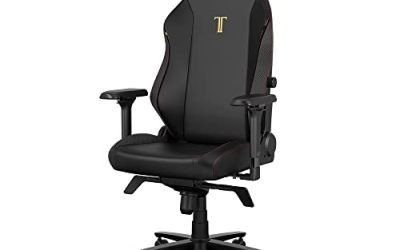
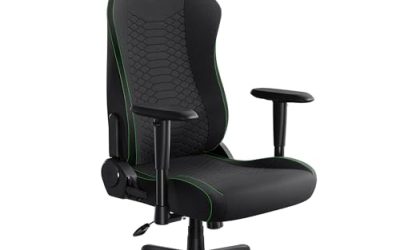
The Razer Iskur V2 X suits buyers who want upper-back support built into the chair rather than added with a separate pillow. Its integrated lumbar arch follows the natural curve of the back, while the widened seat base gives the shoulders and torso room to sit squarely. High-density foam cushions hold their shape during long sessions, and the plush fabric finish feels softer against the upper back than a slick surface. The 152-degree recline allows a relaxed lean without forcing the shoulders forward.
Specs
- Built-in lumbar support with integrated lumbar arch
- Widened seat base
- High-density foam cushions
- Plush fabric finish
- 152-degree adjustable recline
- 2D armrests
Best for: Sitting for long periods with built-in support across the back.
Watch out for: Check the seat width and backrest height against your own shoulders before ordering, since the support is built in rather than adjustable with a pillow.
ASIN: B0DP5SY554
Corsair TC100 Relaxed

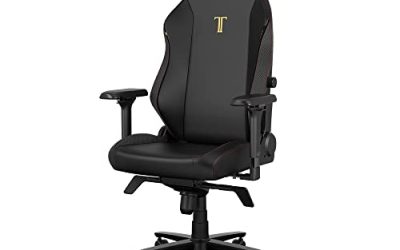
The Corsair TC100 Relaxed focuses on the neck and shoulder area, which makes it a strong match for upper back discomfort. Its detachable memory foam neck pillow supports the curve of the neck, while the included lumbar pillow adds support lower down. The 375 mm wide seat gives the torso room to sit evenly, and the fabric finish provides a breathable surface for long sessions. With a recline range of 90 to 150 degrees, the chair moves from upright work to a relaxed lean while keeping the backrest behind the shoulders.
Specs
- 375 mm wide seat
- Lumbar pillow included
- Detachable memory foam neck pillow
- 90- to 150-degree recline
- Class 4 gas lift with 100 mm height range
- Adjustable armrests
- Racing-inspired design, fabric finish
Best for: Upright desk work with dedicated neck pillow support.
Watch out for: Confirm the neck pillow height suits your neck, because a pillow that sits too high or too low will not relieve shoulder tension.
ASIN: B0BN7FDFVP
RESPAWN 110 Pro

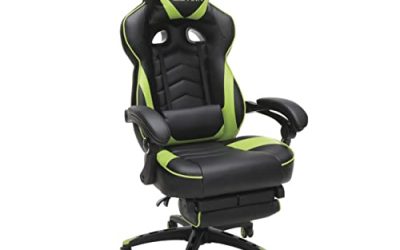
The RESPAWN 110 Pro stands out for its recline control, which matters when the upper back needs contact at different angles. Its 155-degree recline with infinite angle lock lets the user stop at the exact lean where the shoulders still rest against the backrest. Dual-density foam cushions provide a firmer base layer with a softer top, and the extendable footrest supports a relaxed posture during breaks. Pivoting padded armrests help keep the arms close to the body so the shoulders do not lift.
Specs
- 155-degree recline with infinite angle lock
- Extendable footrest
- 275-pound maximum weight recommendation
- Dual-density foam cushions
- Seat height 18.5 to 21.7 inches
- Pivoting padded armrests
Best for: Leaning back at varied angles while keeping shoulder contact.
Watch out for: Check the seat height range against your desk height so the armrests and shoulders stay level during upright work.
ASIN: B0DGKVGH8X
Homall Massage Lumbar

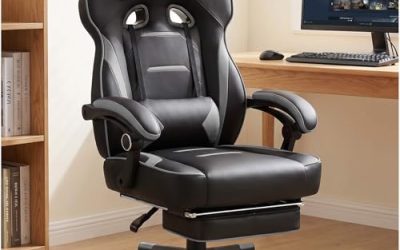
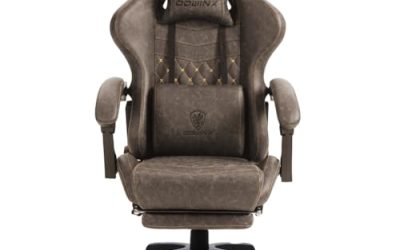
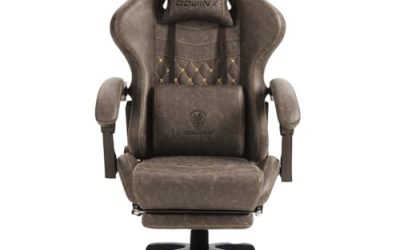
The Homall Massage Lumbar adds a massage lumbar pillow and a retractable footrest to a chair built for relaxed sitting. Its adjustable headrest lets the user set neck support to their own height, which helps keep the head from drifting forward and loading the upper back. The 90- to 135-degree recline covers upright work and a moderate lean, while the 360-degree swivel makes it easy to turn without twisting the torso. High-density foam cushions and a PU leather cover complete a straightforward design.
Specs
- Massage lumbar pillow
- Retractable footrest
- 90- to 135-degree recline
- 360-degree swivel
- High-density foam cushions
- PU leather cover
- BIFMA-certified metal base
- Adjustable headrest
Best for: Relaxed sitting with a footrest, massage pillow, and adjustable headrest.
Watch out for: Note the 135-degree maximum recline, which is more limited than the other chairs here if you prefer a deeper lean.
ASIN: B0C4Q5MJNM
Which One Fits Your Situation
You sit upright for most of the day
Choose the Corsair TC100 Relaxed. Its detachable memory foam neck pillow supports the neck during upright work, and the lumbar pillow adds lower-back support without changing the chair shape. The 375 mm wide seat and adjustable armrests help keep the shoulders level, which matters most when the user stays upright for hours.
You want support without adjusting pillows
Choose the Razer Iskur V2 X. Its built-in lumbar support with integrated lumbar arch stays in place, so there is no pillow to reposition during the day. The widened seat base and high-density foam cushions keep the torso square against the backrest, and the 152-degree recline covers relaxed breaks. That suits users who prefer a set-and-forget setup.
You recline often and at different angles
Choose the RESPAWN 110 Pro. Its 155-degree recline with infinite angle lock lets you stop at the angle where the upper back still touches the backrest. The extendable footrest supports relaxed sitting, and the pivoting padded armrests keep the arms close so the shoulders stay down. That control suits long evenings when posture changes between upright play and relaxed breaks.
You want a footrest and a headrest you can move
Choose the Homall Massage Lumbar. Its adjustable headrest matches different neck heights, while the retractable footrest supports the legs during breaks. The massage lumbar pillow adds a different kind of back support, and the 360-degree swivel helps avoid twisting when turning. That combination suits relaxed evenings when the chair is used for reading, watching, and light gaming.
Common Mistakes
- Choosing a chair by seat comfort alone and ignoring whether the backrest reaches the shoulders.
- Placing the headrest too low, so the neck bends forward and the upper back takes the strain.
- Reclining too far back for desk work, which pulls the shoulders away from the backrest.
- Setting armrests too low or too high, forcing the shoulders to lift or hunch.
- Assuming a lumbar pillow will fix upper back discomfort when the real gap is at shoulder height.
Frequently Asked Questions
Can a gaming chair help with upper back pain?
A gaming chair can support the upper back through a tall backrest, a headrest, and a recline that keeps the shoulders in contact, but it does not treat or cure pain. The features in this guide describe support and posture, not medical treatment. If pain is persistent or severe, talk to a healthcare professional before relying on a chair change alone.
How high should the backrest be for upper back support?
The backrest should reach at least to the shoulder blades, and ideally to the top of the shoulders, so the upper back can rest against it while sitting upright. If the backrest ends below the shoulders, the muscles between the shoulder blades must hold the torso up. A tall backrest with a headrest gives the neck and shoulders a place to rest.
Is built-in lumbar support better than a pillow for the upper back?
Built-in lumbar support stays in place and follows the curve of the back, which suits users who do not want to adjust a pillow. A separate pillow can be moved up or down, which helps when the user wants support higher on the back. For upper back comfort specifically, the headrest and backrest height matter as much as the lumbar design.
Does recline matter for the upper back?
Yes, recline matters because the upper back needs contact at the angle where the user actually sits. A recline with an angle lock lets the user stop where the shoulders still touch the backrest. Without that control, the user may sit between two angles and lose contact, which leaves the upper back unsupported during relaxed sitting.
Related guides
More from Amazon
Programs that pair well with the guide above. Offers and eligibility are set by Amazon and may change.
Free shipping on eligible items, Prime Video and more. Eligible new members can start with a free trial.
Start a Prime free trialAudiobooks and podcasts to listen to on the go. Eligible new members can start with a free trial.
Try Audible freeAd-free music streaming. Eligible new subscribers can start with a free trial.
Try Music Unlimited freeA free business account with business pricing and bulk-buying tools for work, shop or home office.
Create a business accountAs an Amazon Associate we earn from qualifying purchases.
Write Your Review
No reviews yet. Be the first to share your experience!