
Key takeaways
- Five PC gaming chairs compared for desk setups, with seat height, armrest adjustment, recline and lumbar support matched to keyboard and mouse use.
What's inside
As an Amazon Associate I earn from qualifying purchases. This post may contain affiliate links at no extra cost to you.
A PC gaming chair has to fit a desk, not just a person. Your keyboard sits at one height, your mouse at another, and your monitor at a third, so a chair that cannot adjust to those fixed points forces your shoulders, wrists and lower back to compensate. For someone whose back aches after long sessions, the real choice is about alignment: seat height against the desk, armrests against the keyboard, and a backrest that lets you shift position between matches.
This article is for PC gamers who play at a desk for several hours, people who use the same chair for work and gaming, and anyone setting up a first PC station and wondering which chair features actually matter. The five chairs below were picked from their names and listed specifications on their Amazon pages, focusing on seat height, armrest movement, recline, lumbar support and weight capacity.
Quick Picks
As an Amazon Associate we earn from qualifying purchases.
| Product | Best for | Key spec from title |
|---|---|---|
| Razer Iskur V2 X | Desk sessions where built-in lumbar support stays aligned all evening | Built-in lumbar support with integrated lumbar arch |
| GTRACING GT099 | A complete desk setup with lumbar and headrest pillows included | 155-degree reclining backrest |
| RESPAWN 110 | A taller backrest and deep seat for long PC sessions | Seat back interior height 32.7 inches |
| Corsair TC100 Relaxed | A wider seat with a detachable memory foam neck pillow | 375 mm wide seat |
| Dowinx 6657A | Reclining with a footrest between matches at a PC desk | USB massage lumbar pillow |
How to Choose
Seat Height Against Your Desk
Start with the distance between your seat and your desk surface, because that gap decides whether your forearms rest flat on the keyboard. A chair with a wide seat-height range lets you raise the seat until your elbows sit close to desk height, then lower it again if your feet lose contact with the floor. Check the listed seat-height range on the product page and compare it with your desk. If the range is narrow, you may end up typing with raised shoulders or dangling feet, and neither position is comfortable for long PC sessions.
Armrests and Keyboard Position
Armrests matter at a PC desk because they set where your elbows rest while you use a keyboard and mouse. Armrests that move up and down, forward and back, and side to side can be lined up with the desk edge, so your forearms stay supported without pushing your shoulders upward. Fixed armrests, by contrast, may sit too high for a low desk or too low for a tall one. Before buying, picture your usual hand position: wrists straight over the keyboard, elbows close to your body, and shoulders relaxed rather than hunched.
Recline and Swivel Between Matches
Between matches, a PC chair should let you lean back and turn without getting up. A recline range that reaches 135 degrees or more gives you a clear change of posture, and a lock that holds the backrest at different angles lets you stop where you want. Swivel matters too: turning the chair to reach your PC tower, a second monitor or a drink should not require scooting the whole chair across the floor. A footrest adds another option for rest periods, though it needs floor space in front of the desk.
Lumbar Support, Upholstery and Weight Rating
Lumbar support at a PC desk comes in several forms: a built-in arch, a dial you turn, or pillows for the lower back and neck. Built-in support stays in place, while pillows can be moved or removed when you want a flatter backrest. Upholstery affects comfort over hours at the desk: fabric breathes and feels soft, while PU leather wipes clean after long use. Weight capacity is a separate specification to check against your own weight, since it covers the frame, gas lift and cushioning together. If back pain is persistent or severe, talk to a healthcare professional.
The 5 Best Options
Razer Iskur V2 X

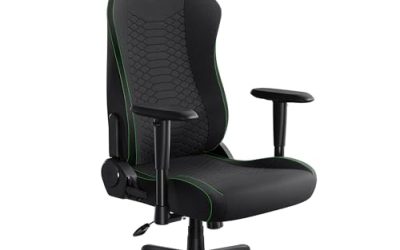
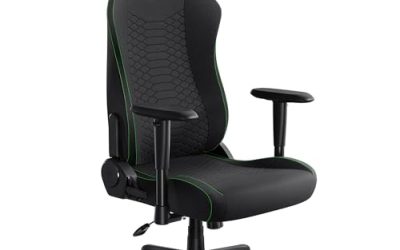
At a PC desk, the Razer Iskur V2 X keeps its lumbar support in the same spot through every match, because the arch is built into the backrest rather than added as a pillow. That consistency helps when you sit upright for hours at a keyboard and do not want to keep adjusting a cushion. A widened seat base gives your hips room to move, and high-density foam cushions hold their shape under repeated use. The plush fabric finish feels soft against the skin, and the backrest reclines to 152 degrees when you lean back between games.
Specs
- Built-in lumbar support with integrated lumbar arch
- Widened seat base
- High-density foam cushions
- Plush fabric finish
- 152-degree adjustable recline
- 2D armrests
Best for: Long PC sessions with lumbar support that stays aligned without adjustment.
Watch out for: The 2D armrests move in fewer directions than 3D or 4D armrests, so confirm they line up with your keyboard height.
ASIN: B0DP5SY554
GTRACING GT099

The GTRACING GT099 arrives with both lumbar and headrest pillows included, so you can set up lower-back and neck support without buying extras. Its backrest reclines to 155 degrees, giving a wide range for leaning back after a match, and 3D armrests adjust in height, depth and width to match your keyboard position. A Class 3 gas lift raises and lowers the seat, and the chair is rated for a maximum weight of 300 pounds. PU leather over high-density foam covers the seat and backrest, and a metal frame supports the structure underneath.
Specs
- 155-degree reclining backrest
- 3D adjustable armrests
- Class 3 gas lift
- 300-pound maximum weight recommendation
- PU leather over high-density foam
- Lumbar and headrest pillows included
- Metal frame
Best for: A ready-to-use PC setup with pillows, recline and 3D armrests included.
Watch out for: The pillows are separate pieces, so check how they attach and whether they stay in place during long sessions.
ASIN: B08HLRQJ25
RESPAWN 110
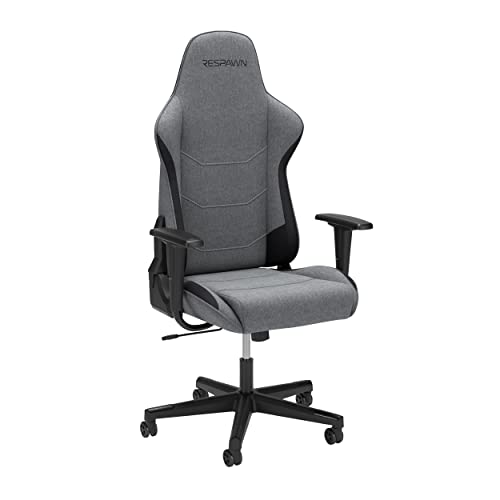
The RESPAWN 110 suits PC players who want a taller backrest and a deeper seat for long sessions at the desk. Its seat back interior height of 32.7 inches and seat depth of 21.5 inches give more room for taller users, and the backrest reclines to 135 degrees with a tilting seat. A steel tube frame supports the chair, and the maximum weight recommendation is 275 pounds. Foam fill with fabric upholstery covers the seat, and a headrest and lumbar support are included for the upper and lower back.
Specs
- 135-degree reclining back with tilting seat
- 275-pound maximum weight recommendation
- Steel tube frame
- Foam fill, fabric upholstery
- Headrest and lumbar support
- Seat depth 21.5 inches
- Seat back interior height 32.7 inches
Best for: Taller PC players who want a deep seat and a tall fabric backrest.
Watch out for: The 135-degree recline is narrower than the 150-degree-plus range on other chairs here, so check it is enough for your breaks.
ASIN: B09V8C78YF
Corsair TC100 Relaxed

The Corsair TC100 Relaxed is the widest-seated chair in this group, with a 375 mm wide seat that gives extra room at a PC desk. A lumbar pillow is included, and a detachable memory foam neck pillow supports the head during reclined breaks. The backrest reclines from 90 to 150 degrees, and a Class 4 gas lift provides a 100 mm height range for matching the seat to your desk. Adjustable armrests move to suit keyboard and mouse position, and the racing-inspired design comes in a fabric finish in gray and black.
Specs
- 375 mm wide seat
- Lumbar pillow included
- Detachable memory foam neck pillow
- 90- to 150-degree recline
- Class 4 gas lift with 100 mm height range
- Adjustable armrests
- Racing-inspired design, fabric finish
Best for: A wide seat with a memory foam neck pillow for reclined breaks at a PC desk.
Watch out for: The neck pillow is detachable, so check whether you want it on the chair during upright play or only during breaks.
ASIN: B0BN7FDFVP
Dowinx 6657A

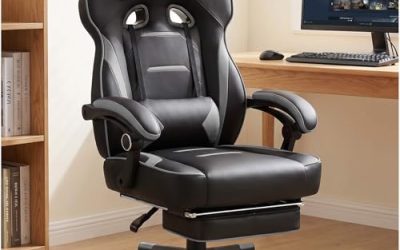
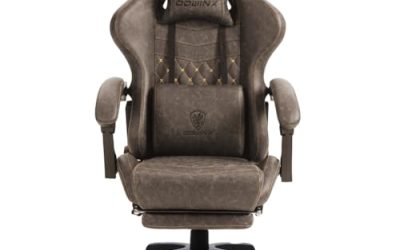
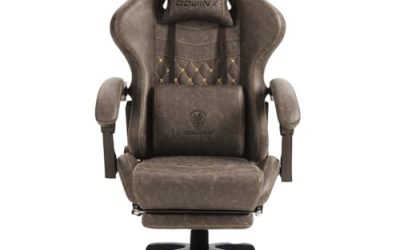
The Dowinx 6657A brings a footrest and a massage lumbar pillow to a PC desk setup, giving you more ways to change position without leaving the chair. Its pocket spring cushion spreads weight across the seat, and the backrest reclines from 90 to 135 degrees. Three-dimensional armrests adjust to match your keyboard and mouse, and an adjustable headrest supports the neck when you lean back. Breathable PU leather covers the chair, the seat back interior height is 32.3 inches, the seat depth is 19.3 inches, and the chair supports up to 300 pounds.
Specs
- USB massage lumbar pillow
- Pocket spring cushion
- 90- to 135-degree reclining backrest
- Retractable footrest
- 3D adjustable armrests
- Adjustable headrest
- Breathable PU leather
- Seat back interior height 32.3 inches
- Seat depth 19.3 inches
- Supports up to 300 pounds
Best for: Changing position at a PC desk with a footrest and massage lumbar pillow.
Watch out for: The massage pillow needs USB power, so make sure a port or adapter is within reach of your desk.
ASIN: B0BYYM8PWH
Which One Fits Your Situation
Your Desk Is Fixed and Your Keyboard Height Cannot Change
Pick the Razer Iskur V2 X when your desk height is fixed and you need the chair to adapt instead. Its seat adjusts to bring your forearms level with the keyboard, and the built-in lumbar arch stays aligned without a pillow to reposition. The widened seat base leaves room to shift during long sessions, and the 152-degree recline is available for breaks between matches.
You Want Pillows and Recline Included in the Box
Pick the GTRACING GT099 when you want lumbar and headrest pillows included from the start. The 155-degree backrest gives a wide recline range, and 3D armrests adjust to your keyboard position in three directions. PU leather over high-density foam and a metal frame round out a complete PC setup, with a 300-pound maximum weight recommendation.
You Are Tall and Need a Deeper Seat
Pick the RESPAWN 110 when a standard seat feels too short or too shallow. Its 32.7-inch seat back interior height and 21.5-inch seat depth give taller players more backrest and seat to work with. The steel tube frame and 275-pound maximum weight recommendation suit a sturdy desk setup, and the included headrest and lumbar support cover the upper and lower back.
You Want the Widest Seat and a Neck Pillow for Breaks
Pick the Corsair TC100 Relaxed when seat width is your priority at a PC desk. The 375 mm wide seat gives extra room, and the detachable memory foam neck pillow supports your head when you recline from 90 to 150 degrees. A Class 4 gas lift with a 100 mm height range helps match the seat to your desk, and adjustable armrests line up with your keyboard and mouse.
Common Mistakes
- Matching the chair to your room instead of matching its seat height to your desk.
- Leaving armrests at the wrong height, which raises your shoulders while you type.
- Buying a chair with a short backrest when you need support up to your shoulders.
- Forgetting to check weight capacity and seat dimensions on the product page.
- Expecting a chair to fix back pain, rather than choosing support features and talking to a healthcare professional if pain is persistent or severe.
Frequently Asked Questions
How do I match a gaming chair to my PC desk height?
Raise or lower the seat until your forearms rest close to desk height with your elbows near your sides. A chair with a wide height range, like the Corsair TC100 Relaxed with its 100 mm gas lift range, gives more room to adjust. If your feet lose contact with the floor at the right height, a footrest can help.
Do I need 3D or 4D armrests for PC gaming?
Armrests that adjust in more directions are easier to line up with a keyboard and mouse, especially if your desk is an unusual height. Three-dimensional armrests adjust in height, depth and width, while 2D armrests cover height and depth only. Either can work if the range matches your desk, so check the listed adjustment before buying.
What recline range is useful at a PC desk?
A range reaching 135 to 155 degrees lets you lean back between matches and change posture without leaving the desk. Chairs in this guide recline to between 135 and 155 degrees. A footrest makes reclined breaks more comfortable, and a lock that holds the backrest at your chosen angle keeps it in place.
Can a gaming chair help if my back hurts after long PC sessions?
A chair can provide adjustable lumbar support, a recline range and armrests that match your desk, which may make long sessions more comfortable. It cannot treat or cure back pain, and no chair should be described that way. If your pain is persistent or severe, talk to a healthcare professional about sitting and activity.
Related guides
More from Amazon
Programs that pair well with the guide above. Offers and eligibility are set by Amazon and may change.
Free shipping on eligible items, Prime Video and more. Eligible new members can start with a free trial.
Start a Prime free trialAudiobooks and podcasts to listen to on the go. Eligible new members can start with a free trial.
Try Audible freeAd-free music streaming. Eligible new subscribers can start with a free trial.
Try Music Unlimited freeA free business account with business pricing and bulk-buying tools for work, shop or home office.
Create a business accountAs an Amazon Associate we earn from qualifying purchases.
Write Your Review
No reviews yet. Be the first to share your experience!