
Key takeaways
- Five embroidery machines that handle both hats and shirts, with cap hoops, free arms, and hoops sized for chest logos, apparel, and matching sets.
What's inside
As an Amazon Associate I earn from qualifying purchases. This post may contain affiliate links at no extra cost to you.
A machine that must handle both hats and shirts faces two different problems in one working day. Shirts need a flat, even hoop and a design that sits straight on the chest, while hats need a curved frame and a logo that stays centred on a structured front. The real decision is therefore about versatility: can one machine switch between a flat shirt hoop and a cap frame without a long changeover, and does it hold enough thread colours for a logo that appears on both items.
This guide is for makers who sell matching cap-and-shirt sets, for team and club orders, and for home businesses that take mixed apparel jobs. The machines below were chosen from their Amazon product titles and listed specifications, focusing on cap handling, hoop range, needle count, and the editing tools that keep a logo consistent across a cap and a shirt.
Quick Picks
As an Amazon Associate we earn from qualifying purchases
| Product | Best for | Key spec from title |
|---|---|---|
| Janome MB-4S | Matching cap and shirt sets with four colours ready | Four-needle machine with included hat hoop |
| Brother Persona PRS100 | Caps, shirts, and tubular garments on a free arm | Single needle, 4-spool thread stand, free-arm embroidery |
| Brother PE900 | Shirt logos sent wirelessly, plus occasional caps | Wireless LAN, 5 inch by 7 inch embroidery field |
| Brother SE1900 | Sewing shirts and embroidering them on one machine | 138 designs, 240 built-in stitches, 5 inch by 7 inch hoop area |
| BAi The Mirror | Mixed hat and shirt orders in small batches | 15 needles, 20 inch by 14 inch area, 850 stitches per minute on hats |
How to Choose
Check How the Machine Switches Between Hats and Shirts
A good dual-purpose machine makes the changeover simple: remove the flat hoop, fit the cap frame, and load the same logo at a smaller size. A free-arm machine helps here, because a shirt sleeve or a cap can slide over the arm without awkward folding. Multi-needle machines usually accept a hat hoop as a standard accessory, while flat-bed machines may need a separate cap hoop. Ask how long the swap takes in practice, because a maker who switches formats several times a day loses time on every fiddly change.
Keep the Logo Consistent Across Both Formats
A team logo should look like the same logo on a cap and on a shirt, even though the sizes differ. That means the machine needs on-screen editing to resize, rotate, or reposition the design without redigitising it. A colour touchscreen makes it easy to preview the logo at cap size and at chest size before stitching. Also check how the machine stores a resized version, because you will reuse the cap version and the shirt version many times. Consistent thread colours matter too, so keep a note of the exact thread shades used for each logo.
Match Hoop Size to Chest Logos and Cap Fronts
A 5 inch by 7 inch hoop covers most chest logos, left-chest motifs, and towel designs, which is the core of shirt work. A 6 inch by 10 inch field adds room for larger chest designs and flat panels, while an 8 inch by 8 inch field suits square motifs on shirts and bags. Cap fronts are smaller, so the cap frame, not the flat hoop, decides hat size. Choose a machine whose flat hoop fits your usual shirt logo and whose cap option fits your usual cap, rather than chasing the largest field for its own sake.
Weigh Needle Count Against Order Size
Single-needle machines are fine for one-colour logos and small mixed orders, because each colour change is a short pause. Four needles suit makers who regularly stitch three- or four-colour logos on both caps and shirts, because the colours stay threaded. Fifteen needles suit a small business taking batches of matching sets, where rethreading for every colour would slow the whole day. Match needle count to how many colours your usual logo uses, not to the largest logo you might one day stitch.
The 5 Best Options
Janome MB-4S

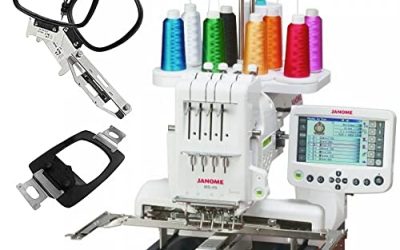
The Janome MB-4S handles the hat-and-shirt combination well because it includes a hat hoop and holds four thread colours at once. A team logo in up to four colours can move from a shirt chest to a cap front without rethreading for each colour, which saves time on matching sets. Its maximum flat embroidery size of 240 millimetres by 200 millimetres covers chest logos and larger shirt motifs, and a top speed of 800 stitches per minute keeps small batches moving. Fifty built-in designs offer simple starting motifs, while USB import brings in customer logos.
Specs
- Four-needle embroidery machine
- Included hat hoop
- Maximum embroidery size of 240 millimetres by 200 millimetres
- Top speed of 800 stitches per minute
- 50 built-in embroidery designs
- USB design import
Best for: Matching cap and shirt sets with multi-colour logos in small batches.
Watch out for: The hat hoop suits certain cap styles better than others, so test the cap and shirt versions of a logo before accepting a full order.
Brother Persona PRS100

The Brother Persona PRS100 is a versatile choice for mixed apparel because its free arm suits caps, shirt sleeves, and tubular garments alike. Its 8 inch by 8 inch embroidery area fits chest motifs and cap-front logos, and the 4-spool thread stand keeps the colours for a logo organised. A 7 inch HD LCD touchscreen previews the design clearly, which helps when the same logo must be resized for a cap and a shirt. The automatic thread cutter keeps the finish tidy on both formats, and a cap frame is available for structured caps.
Specs
- 8 inch by 8 inch embroidery area
- Single-needle embroidery machine
- 4-spool thread stand
- Free-arm embroidery for tubular and shaped items
- 7 inch HD LCD touchscreen
- Automatic thread cutter
Best for: Mixed apparel where caps, sleeves, and shirts all need embroidery on one machine.
Watch out for: Single-needle stitching means manual thread changes for each colour, and the cap frame is a separate accessory to confirm.
Brother PE900
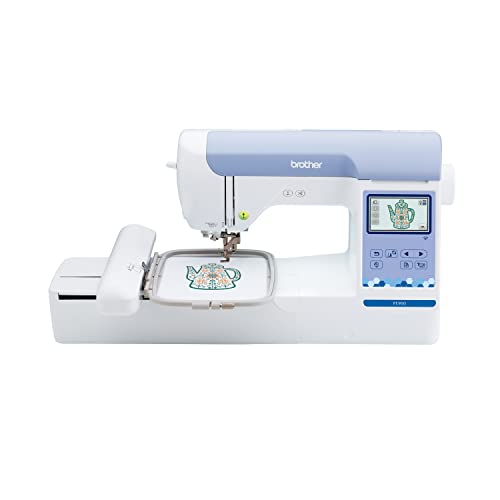
The Brother PE900 suits shirt work first, with cap work as a useful extra. Its 5 inch by 7 inch field covers chest logos and left-chest motifs, and wireless LAN transfer lets you send a logo from a computer without a USB stick. The machine cuts jump stitches, so a multi-colour shirt logo looks tidier on the reverse, and the touchscreen supports resizing a logo for a smaller cap version. USB import brings in a specific logo file.
Specs
- Wireless LAN connection
- 5 inch by 7 inch embroidery field
- Cuts jump stitches
- Embroidery-only machine
- Colour touchscreen display for design editing
- USB port for design import
Best for: Shirt logos with wireless transfer, plus occasional caps using a suitable cap accessory.
Watch out for: Cap work on this flat-bed model needs a compatible cap hoop accessory and careful stabilising, so test on a spare cap first.
Brother SE1900

The Brother SE1900 is the pick for makers who also construct or alter the shirts they embroider. Its 240 built-in sewing stitches and eight presser feet handle seams, hems, and repairs, while its 138 embroidery designs add logos and motifs to the finished garment. The 5 inch by 7 inch hoop fits chest logos and towel designs, and the 3.2 inch LCD touchscreen keeps both sewing and embroidery settings visible. For a maker who buys plain shirts, adjusts them, and then embroiders a matching cap, having both functions in one machine saves space and handling.
Specs
- 138 embroidery designs
- 240 built-in sewing stitches
- 5 inch by 7 inch hoop area
- 3.2 inch LCD touchscreen display
- 8 included presser feet
- Computerised sewing and embroidery machine
Best for: Makers who sew, alter, and embroider shirts, with caps as a related extra.
Watch out for: Switching between sewing and embroidery modes takes setup time, and structured caps still need a proper cap frame.
BAi The Mirror

The BAi The Mirror is the batch-work choice for matching hats and shirts. Fifteen needles hold a full logo palette, so a multi-colour design can run on a shirt and then on a cap without rethreading between colours. The listing notes 850 stitches per minute on hats and a maximum of 1200 stitches per minute for flat work, which reflects the different demands of curved and flat fabric. Its 20 inch by 14 inch area covers large shirt designs as well as smaller motifs, and Wi-Fi and USB transfer keep logo files moving to the machine.
Specs
- 15-needle commercial embroidery machine
- 20 inch by 14 inch embroidery area
- Maximum speed of 1200 stitches per minute
- 850 stitches per minute on hats
- Wi-Fi and USB design transfer
- Institch OS5 intuitive control with included software
Best for: Small businesses stitching matching hat and shirt batches with full-colour logos.
Watch out for: A commercial machine needs space, a sturdy table, and learning time for its software before taking paid batch orders.
Which One Fits Your Situation
You Sell Matching Cap and Shirt Sets
Choose the Janome MB-4S, because it includes a hat hoop and holds four colours at once, so the same logo can move from shirt to cap with minimal rethreading. Test both versions on spare items first, so the colours and placement match across the set. Press the shirt and cap side by side when they are finished, so any colour mismatch shows up before delivery.
You Take Small Mixed Apparel Orders
Choose the Brother Persona PRS100, because its free arm handles caps, sleeves, and shirts, and its 8 inch by 8 inch field fits the motifs those items need. Plan for manual thread changes on multi-colour logos, and confirm the cap frame for your cap style. Note the hoop and stabiliser used for each item, so the next mixed order repeats the same setup.
You Mainly Embroider Shirts and Add Caps Occasionally
Choose the Brother PE900, because wireless transfer and a 5 inch by 7 inch field make shirt logos straightforward, and a cap accessory can cover the occasional hat. It suits a maker whose core work is shirts rather than daily cap production. Keep one spare cap in the same style as your usual order, so an occasional hat request never catches you unprepared.
You Run Batches of Full-Colour Sets
Choose the BAi The Mirror, because 15 needles keep a whole logo palette threaded across a batch of shirts and caps. That removes the repeated rethreading that slows single-needle machines on multi-colour orders. Run one complete set first and check it against the customer sample, before stitching the rest of the batch.
Common Mistakes
- Using the shirt-size logo on a cap without resizing it for the smaller front panel.
- Forgetting that caps need a curved frame and cap stabiliser, not a flat shirt hoop.
- Changing thread shades between the cap and the shirt, so the set no longer matches.
- Hooping a stretchy shirt without stabiliser, which lets the logo distort.
- Skipping a test stitch on the same shirt fabric and cap style as the real order.
Frequently Asked Questions
Can one machine embroider both hats and shirts well?
Yes, if it has a cap frame option and a flat hoop that fits your shirt logos. Multi-needle machines and free-arm models handle the switch most easily. Flat-bed machines can do both, but they need a suitable cap hoop accessory and careful stabilising for structured caps.
Should the logo be the same size on a hat and a shirt?
No, the cap version is usually smaller, because the cap front is limited by the brim and crown seams. Use on-screen editing to resize the same logo for each format, and keep the thread colours identical so the set looks matched.
How do I keep a logo centred on a cap?
Mark the centre of the cap front before hooping, and use the cap frame to hold the curve steady. Preview the placement on the machine screen, and stitch a test cap first. A logo that looks centred on screen can still drift if the cap was hooped off-centre.
Is a multi-needle machine worth it for mixed orders?
It is worth it when your logos use several colours and you take regular batches, because it removes repeated rethreading. For occasional one-colour logos, a single-needle machine with a good cap frame is enough and simpler to learn. A single-needle machine can still produce a tidy result, but each colour change adds a pause to the working day.
Related guides
More from Amazon
Programs that pair well with the guide above. Offers and eligibility are set by Amazon and may change.
Free shipping on eligible items, Prime Video and more. Eligible new members can start with a free trial.
Start a Prime free trialAudiobooks and podcasts to listen to on the go. Eligible new members can start with a free trial.
Try Audible freeAd-free music streaming. Eligible new subscribers can start with a free trial.
Try Music Unlimited freeA free business account with business pricing and bulk-buying tools for work, shop or home office.
Create a business accountAs an Amazon Associate we earn from qualifying purchases.
Write Your Review
No reviews yet. Be the first to share your experience!