
Key takeaways
- Five embroidery machines for a home business, balancing throughput, reliability, hoop range, and the features that keep small orders on schedule.
What's inside
As an Amazon Associate I earn from qualifying purchases. This post may contain affiliate links at no extra cost to you.
Running embroidery from home changes the buying question from what a machine can stitch to how reliably it can stitch the same thing, day after day, without eating the whole working day. A home business needs throughput for small batches, a hoop range that covers towels, shirts, and caps, and a machine that does not demand constant rethreading for every colour change. Space matters too, because the machine shares a room with storage, packing, and thread supplies.
This guide is for home-based makers taking paid orders for personalised gifts, team apparel, and small-batch logos. The machines below were chosen from their Amazon product titles and listed specifications, focusing on needle count, embroidery field, speed, and the design transfer options that keep a home workflow moving.
Quick Picks
As an Amazon Associate we earn from qualifying purchases
| Product | Best for | Key spec from title |
|---|---|---|
| BAi The Mirror | Full-colour batches with minimal rethreading | 15 needles, 20 inch by 14 inch area, 1200 stitches per minute |
| Janome MB-4S | Four-colour logos on shirts and caps | Four-needle machine with included hat hoop |
| Brother Persona PRS100 | Varied home orders on caps, sleeves, and shirts | Single needle, 4-spool thread stand, free-arm embroidery |
| Brother Innov-is NQ1700E | Wide-field work with wireless file transfer | 6 inch by 10 inch field size, cuts jump stitches, wireless |
| Brother PE900 | Reliable single-needle work with wireless transfer | Wireless LAN, 5 inch by 7 inch embroidery field |
How to Choose
Match Needle Count to Your Usual Logo
Needle count is the clearest throughput lever in a home business. A single-needle machine stops for every colour change, which is fine for a one-colour name but slow for a five-colour logo repeated twenty times. Four needles hold the colours for most team logos, while 15 needles hold a whole palette and remove rethreading from the working day. Count the colours in your three most-ordered logos, then choose a needle count that covers the largest of them. That one check prevents the most common home-business bottleneck.
Choose a Field That Covers Your Best Sellers
Your best-selling items decide the field you need, not the largest design you can imagine. A 5 inch by 7 inch field covers chest logos, towels, and small gifts, which are the core of many home businesses. A 6 inch by 10 inch field adds larger chest designs and flat panels, while a 20 inch by 14 inch field covers jacket backs and large home textiles. Measure your top five products, note the largest design among them, and pick a field that fits it comfortably. A field that is too small forces rehooping on your best seller, which costs time on every order.
Plan for Design Files, Not Just Built-in Motifs
Home businesses live on customer logos, team emblems, and names, which rarely come from a built-in library. USB import is the minimum for receiving customer files, while wireless transfer lets you send a file from a computer in another room. Software for lettering and basic editing also helps, because customers often ask for a name added to a logo or a small change in size. Check how the machine handles file formats you receive, and keep a simple folder system for each customer so a repeat order does not mean hunting for the file again.
Weigh Reliability, Space, and Support Before Speed
Top speed looks impressive on a listing, but a home business suffers more from downtime than from a slightly slower stitch rate. A machine that is easy to clean, oil where required, and thread correctly will finish more orders than a faster machine that jams often. Commercial multi-needle heads need floor space, a sturdy table, and ventilation, while a compact single-needle machine fits a spare room more easily. Also check what support and spare parts are available for the model, because a machine that waits weeks for a part is a business that cannot take orders.
The 5 Best Options
BAi The Mirror

The BAi The Mirror is the throughput pick for a home business that has moved beyond occasional orders. Fifteen needles hold a full logo palette, so a multi-colour design runs without the repeated rethreading that slows single-needle machines. Its maximum speed of 1200 stitches per minute suits flat work, while the listed hat speed of 850 stitches per minute keeps cap orders moving. A 20 inch by 14 inch embroidery area covers large shirt designs and home textiles, and Wi-Fi and USB transfer bring customer files to the machine quickly.
Specs
- 15-needle commercial embroidery machine
- 20 inch by 14 inch embroidery area
- Maximum speed of 1200 stitches per minute
- 850 stitches per minute on hats
- Wi-Fi and USB design transfer
- Institch OS5 intuitive control with included software
Best for: Home businesses taking regular multi-colour batches for shirts, caps, and textiles.
Watch out for: A commercial head needs dedicated space, a sturdy table, and time to learn the software, so plan the room layout before ordering.
Janome MB-4S

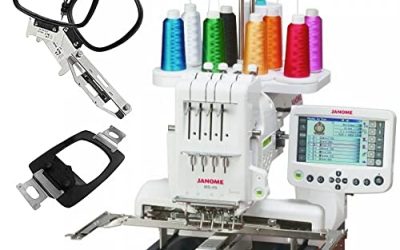
The Janome MB-4S fits a home business that takes team and club orders in modest batches. Four needles cover most logos without constant rethreading, and the included hat hoop means cap orders do not need a separate accessory purchase. Its maximum flat size of 240 millimetres by 200 millimetres handles chest logos and larger motifs, while a top speed of 800 stitches per minute keeps a batch of shirts moving. Fifty built-in designs provide simple motifs, and USB import handles customer logos and lettering.
Specs
- Four-needle embroidery machine
- Included hat hoop
- Maximum embroidery size of 240 millimetres by 200 millimetres
- Top speed of 800 stitches per minute
- 50 built-in embroidery designs
- USB design import
Best for: Home businesses taking four-colour team and club orders on shirts and caps.
Watch out for: Four needles cover most logos, but a logo with more colours will still need a manual change, so check your usual palette first.
Brother Persona PRS100

The Brother Persona PRS100 suits a home business with varied orders, because its free arm handles caps, sleeves, bags, and shirts that do not lie flat. Its 8 inch by 8 inch field fits generous motifs, and the 4-spool thread stand keeps the colours for a logo organised and ready. A 7 inch HD LCD touchscreen gives a clear preview, which helps when a customer asks for a name added to a design. The automatic thread cutter keeps the finish tidy, which matters when the customer sees the reverse side of a garment.
Specs
- 8 inch by 8 inch embroidery area
- Single-needle embroidery machine
- 4-spool thread stand
- Free-arm embroidery for tubular and shaped items
- 7 inch HD LCD touchscreen
- Automatic thread cutter
Best for: Varied home orders where caps, sleeves, bags, and shirts all appear in the same week.
Watch out for: Single-needle stitching means a thread change for each colour, so price multi-colour orders with that time in mind.
Brother Innov-is NQ1700E

The Brother Innov-is NQ1700E is a strong single-needle option for a home business that values a wide field and wireless workflow. Its 6 inch by 10 inch field covers larger chest designs and rectangular panels, and wireless transfer removes the USB step when a customer sends a logo file. The machine cuts jump stitches, which keeps multi-colour work tidy, and the bundle listing includes BES lettering software and a magnetic hoop. That combination helps with names, labels, and thick items that need even clamping.
Specs
- 6 inch by 10 inch embroidery field size
- Cuts jump stitches
- Wireless connectivity
- Includes BES lettering software
- Includes Brother magnetic hoop in this bundle listing
- Colour touchscreen for design editing
Best for: Home businesses that want a wide field and wireless file transfer on a single-needle machine.
Watch out for: The magnetic hoop and software are part of a bundle listing, so confirm the exact contents and check that the hoop suits your usual items.
Brother PE900
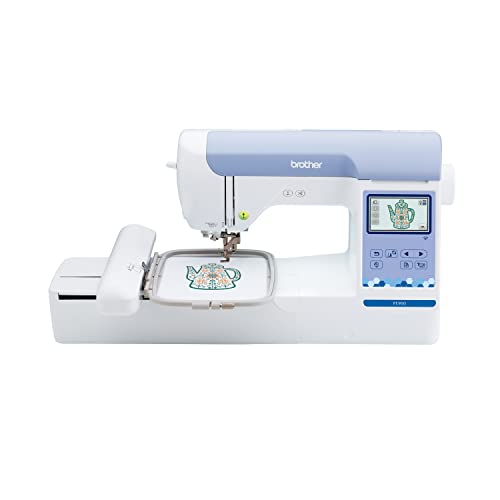
The Brother PE900 is the compact, reliable choice for a home business that is still growing. Its 5 inch by 7 inch field covers the chest logos, towels, and gifts that make up most early orders, and wireless LAN transfer keeps file handling simple. Jump-stitch cutting tidies multi-colour designs, and the touchscreen supports resizing and repositioning a logo for different garments. As an embroidery-only machine, it keeps the workflow focused, which helps when you are stitching between packing and customer messages.
Specs
- Wireless LAN connection
- 5 inch by 7 inch embroidery field
- Cuts jump stitches
- Embroidery-only machine
- Colour touchscreen display for design editing
- USB port for design import
Best for: Growing home businesses that need reliable single-needle work with wireless transfer.
Watch out for: The 5 inch by 7 inch field will not fit large jacket-back designs in one hooping, so check your largest regular order before choosing it.
Which One Fits Your Situation
You Take Regular Multi-Colour Batches
Choose the BAi The Mirror, because 15 needles remove rethreading from the working day and the large field covers most apparel and textile sizes. It suits a home business where the same full-colour logo repeats across a batch of shirts and caps. Keep thread, stabiliser, and blank garments in one place, so a batch order starts without a search through cupboards.
You Take Team and Club Orders
Choose the Janome MB-4S, because four needles cover most team logos and the included hat hoop handles caps without an extra accessory. It is a practical middle step between a single-needle home machine and a commercial head. Confirm the logo size and colours in writing before the batch starts, so there is no dispute when the order is collected.
Your Orders Vary Every Week
Choose the Brother Persona PRS100, because its free arm and 8 inch by 8 inch field handle caps, sleeves, bags, and shirts in the same week. The large touchscreen helps with the frequent resizing and lettering changes that varied orders bring. Photograph each finished item before packing, so you have a record if a customer asks about a detail later.
You Are Building a Business From a Spare Room
Choose the Brother PE900, because its compact embroidery-only design, wireless transfer, and 5 inch by 7 inch field cover the core orders without demanding commercial floor space. Upgrade to a multi-needle head once batch sizes make rethreading the main delay. Set a weekly order limit while you are learning, so quality stays high as the business grows.
Common Mistakes
- Buying a single-needle machine for full-colour logos, then losing hours to thread changes.
- Accepting a design larger than the hoop, then splitting it without telling the customer.
- Pricing orders without allowing time for hooping, stabilising, and trimming.
- Storing customer logo files in scattered folders, so repeat orders take longer to find.
- Skipping a test stitch on the exact garment and fabric for a paid order.
Frequently Asked Questions
How many needles does a home embroidery business need?
It depends on your logos. One needle is enough for one-colour names and simple motifs. Four needles cover most team logos, while 15 needles suit regular full-colour batches. Count the colours in your most-ordered logos before choosing, because that number decides how much time you spend rethreading.
Can I run an embroidery business from a spare room?
Yes, if the machine fits the space and you have room for thread, stabiliser, and packing. A compact single-needle or four-needle machine fits a spare room well. A commercial multi-needle head needs more floor space, a sturdy table, and clear space for the hoop to travel.
Do I need special software for customer logos?
You need a way to receive and transfer logo files, which USB or wireless transfer provides. Lettering software helps when customers ask for names added to a logo. Full digitising software is a separate step, and many home businesses outsource digitising until order volume justifies learning it.
How do I avoid delays on repeat orders?
Keep a clear folder for each customer with the logo file, thread colours, hoop size, and stabiliser used. Stitch a test piece when a new garment style arrives, and confirm the design size with the customer before starting a batch. Those notes turn a repeat order into a straightforward rerun.
Related guides
More from Amazon
Programs that pair well with the guide above. Offers and eligibility are set by Amazon and may change.
Free shipping on eligible items, Prime Video and more. Eligible new members can start with a free trial.
Start a Prime free trialAudiobooks and podcasts to listen to on the go. Eligible new members can start with a free trial.
Try Audible freeAd-free music streaming. Eligible new subscribers can start with a free trial.
Try Music Unlimited freeA free business account with business pricing and bulk-buying tools for work, shop or home office.
Create a business accountAs an Amazon Associate we earn from qualifying purchases.
Write Your Review
No reviews yet. Be the first to share your experience!