
Key takeaways
- Five compact embroidery machines for occasional home use, with simple setup, built-in designs, and hoops sized for gifts and personal projects.
What's inside
As an Amazon Associate I earn from qualifying purchases. This post may contain affiliate links at no extra cost to you.
For occasional home use, the best embroidery machine is the one that is easy to bring out, simple to set up, and quick to put away again. The real decision is not about maximum speed or the largest hoop, but about whether the machine fits a kitchen table or a craft corner, whether it has enough built-in designs for a weekend gift, and whether the first stitch happens without a long learning curve. A compact machine that gets used often beats a large one that stays in a cupboard.
This guide is for hobbyists who embroider a few times a month, for gift makers, and for sewists who want to personalise clothes and home textiles without turning a room into a workshop. The machines below were chosen from their Amazon product titles and listed specifications, focusing on compact size, built-in designs, screen clarity, and simple file transfer.
Quick Picks
As an Amazon Associate we earn from qualifying purchases
| Product | Best for | Key spec from title |
|---|---|---|
| Brother PE535 | Small gifts and monograms in a compact machine | 80 built-in designs, 4 inch by 4 inch hoop area |
| Brother SE600 | Home sewing plus embroidery in one compact machine | 80 designs, 103 built-in stitches, 4 inch by 4 inch hoop area |
| Brother PE545 | Wireless transfers for relaxed weekend projects | 135 built-in designs, 4 inch by 4 inch hoop area, wireless LAN |
| Brother PE550D | Children’s gifts with familiar character designs | 125 built-in designs including 45 Disney designs, 4 inch by 4 inch hoop area |
| Brother SE700 | Sewing and embroidery with wireless transfer | 135 built-in designs, 103 built-in stitches, 4 inch by 4 inch hoop area |
How to Choose
Fit the Machine to Your Available Space
Home machines live on a table that is also used for other things, so footprint and weight matter. A 4 inch by 4 inch hoop keeps the machine compact, because the embroidery unit does not extend far from the body. Check the machine dimensions on the listing and measure the table where you plan to work, leaving room behind the machine for the hoop to move. A lighter machine is also easier to lift out of a cupboard and put away after a session, which makes you more likely to use it regularly.
Rely on Built-in Designs for Occasional Projects
When you embroider occasionally, you do not want to spend the session shopping for files or learning new software. A built-in library of 80 designs covers monograms, borders, and simple motifs for towels, baby clothes, and cushions. A library of 125 or 135 designs adds seasonal themes and character options, which helps when a gift needs a specific theme at short notice. Several lettering fonts are useful too, because a name or initial is the most common request for a personalised gift. USB or wireless import is a bonus for later, not a requirement for the first project.
Keep the Controls Simple and Visible
A clear touchscreen makes occasional use much easier, because you do not have to relearn the controls every time you bring the machine out. A 3.2 inch display shows the design and the main settings clearly, while a 3.7 inch display gives a little more room for previewing. Automatic needle threading removes a fiddly step, and a bright work light helps you see the needle area in a room that is not a dedicated studio. If the machine also sews, check that switching modes is straightforward, so a sewing project does not turn into a manual-reading exercise.
Decide Whether the Machine Should Also Sew
Some home users already own a sewing machine they like, in which case an embroidery-only model keeps things simple and focused. Others want one machine that can sew a cushion cover, repair a hem, and then embroider a motif on the same item. Combination machines add sewing stitches and presser feet, which is handy in a small home, but they also add menu options to learn. If your sewing machine is old or unreliable, a combination model can replace it. If it works well, an embroidery-only machine is usually the tidier choice.
The 5 Best Options
Brother PE535

The Brother PE535 is a compact, uncomplicated choice for occasional home embroidery. Its 4 inch by 4 inch hoop suits monograms, small flowers, and pocket motifs, and the 80 built-in designs cover the themes most home projects need. A 3.2 inch LCD touchscreen previews the design clearly, and the USB port lets you add a specific design later without changing machines. Automatic needle threading and an embroidery-only layout keep the setup short, so a weekend gift can be finished in one relaxed session rather than spread across several evenings.
Specs
- 80 built-in embroidery designs
- 4 inch by 4 inch hoop area
- 3.2 inch LCD touchscreen display
- USB port for design import
- 9 built-in lettering font styles
- Embroidery-only machine
Best for: Occasional home gifts and monograms on a compact, simple machine.
Watch out for: The small hoop will not fit a large chest design, so it suits small motifs and gifts rather than large apparel work.
Brother SE600

The Brother SE600 suits a home where one machine must do a bit of everything. It combines 80 embroidery designs with 103 built-in sewing stitches, so you can sew a simple tote or cushion cover and then embroider it without moving to another machine. Seven included presser feet cover common sewing tasks, and the 3.2 inch LCD touchscreen guides both modes. The 4 inch by 4 inch embroidery hoop keeps projects small and manageable, which fits the scale of most home sewing and gift making.
Specs
- 80 embroidery designs
- 103 built-in sewing stitches
- 4 inch by 4 inch hoop area
- 3.2 inch LCD touchscreen display
- 7 included presser feet
- Computerised sewing and embroidery machine
Best for: Homes that want basic sewing and embroidery from one compact machine.
Watch out for: Changing between sewing and embroidery takes a few steps, so keep the manual nearby for the first few changeovers.
Brother PE545
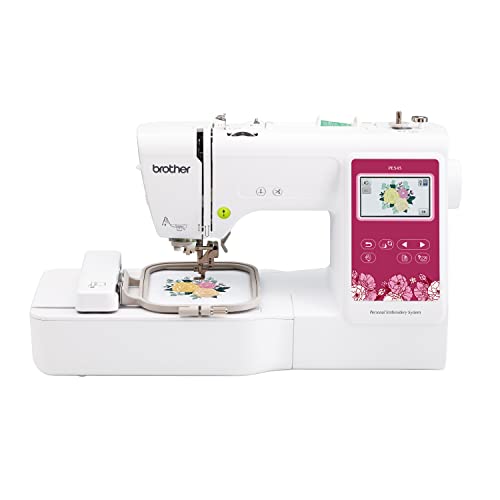
The Brother PE545 adds wireless convenience to a compact home machine, which suits makers who prepare designs on a phone or laptop in another room. It offers 135 built-in designs and 10 font styles, giving more choice for names, seasonal motifs, and gifts without buying extra files. The 3.7 inch LCD touchscreen previews designs at a comfortable size, and wireless LAN transfer plus a USB port cover both ways of importing a file. The 4 inch by 4 inch hoop keeps the machine compact and the projects at a relaxed scale.
Specs
- 135 built-in embroidery designs
- 4 inch by 4 inch hoop area
- 3.7 inch LCD touchscreen display
- Wireless LAN connection
- USB port for design import
- 10 built-in lettering font styles
Best for: Home makers who want wireless design transfer and a larger screen.
Watch out for: Wireless transfer relies on a steady home network, so the USB port is a useful fallback if the signal is weak in your craft corner.
Brother PE550D

The Brother PE550D is the home pick for children’s gifts, because its 125 built-in designs include 45 Disney designs. A familiar character turns a plain baby blanket, T-shirt, or towel into a gift a child will actually notice, and the nine fonts let you add a name beside the character. The 4 inch by 4 inch hoop fits those small motifs well, and the 3.2 inch colour touchscreen makes previewing a character easy. An automatic needle threader and USB import round out a machine that is meant for fun, occasional projects rather than production work.
Specs
- 125 built-in embroidery designs, including 45 Disney designs
- 4 inch by 4 inch hoop area
- 3.2 inch colour touchscreen display
- USB port for design import
- 9 built-in lettering font styles
- Automatic needle threader
Best for: Children’s gifts and birthday items with character designs at home.
Watch out for: Character motifs are sized for the small hoop, so larger designs will need a different machine or a split design.
Brother SE700

The Brother SE700 is the combination-machine option for a home that wants sewing, embroidery, and wireless transfer together. Its 135 built-in embroidery designs and 103 built-in sewing stitches cover a wide range of home projects, from monogrammed towels to simple garments. The 3.7 inch touchscreen gives a clearer preview than the SE600, and wireless LAN connection lets you send a design without a USB stick. Eight included presser feet support everyday sewing, while the 4 inch by 4 inch hoop keeps embroidery projects at a home-friendly size.
Specs
- 135 built-in embroidery designs
- 103 built-in sewing stitches
- 4 inch by 4 inch hoop area
- 3.7 inch touchscreen display
- Wireless LAN connection
- 8 included presser feet
Best for: Homes that want sewing, embroidery, and wireless transfer in one machine.
Watch out for: The extra functions add menu options, so allow a couple of practice sessions to learn where each setting lives.
Which One Fits Your Situation
You Embroider a Few Times a Month
Choose the Brother PE535, because its compact size, 80 built-in designs, and simple embroidery-only layout make it easy to bring out and put away. Small gifts and monograms are its natural work, and USB import is there when you want a specific design. Keep the hoop, stabiliser, and a few plain towels in one box, so a weekend project starts in minutes.
You Want One Machine for Sewing and Embroidery
Choose the Brother SE600 for a simpler start, or the SE700 if wireless transfer matters to you. Both let you sew a cushion cover or tote and then embroider it on the same machine, which saves space in a home that does not have a dedicated craft room. Choose a simple first sewing project, such as a tote, before adding embroidery to it.
You Make Gifts for Children
Choose the Brother PE550D, because 45 Disney designs give you ready-made motifs for birthdays, baby showers, and school items. The small hoop fits those designs well, and the fonts let you add the child’s name. Make the gift a week before it is needed, so there is time to restitch if the first attempt puckers.
You Prefer Preparing Designs Away From the Machine
Choose the Brother PE545, because wireless transfer and a 3.7 inch touchscreen let you choose and send a design from a phone or computer. The 135 built-in designs also mean you can start a project immediately, without preparing a file first. Charge the phone or laptop before a session, so a file transfer never stalls halfway through a design.
Common Mistakes
- Buying a large commercial machine for occasional use, then struggling to store it.
- Choosing a machine with almost no built-in designs, so every project needs a file purchase.
- Hooping fabric too tightly, which distorts the design once it is removed from the hoop.
- Forgetting stabiliser on a T-shirt, so the embroidery puckers after washing.
- Storing the machine in a damp or dusty place, which affects threading and stitch quality.
Frequently Asked Questions
How much space does a home embroidery machine need?
A compact 4 inch by 4 inch machine fits a kitchen table or a craft desk, with a little room behind it for the hoop to travel. Measure the table before buying, and leave space for thread, stabiliser, and the item you are embroidering. Larger machines need a dedicated table and more clearance.
Can I use an embroidery machine if I do not sew?
Yes, an embroidery-only machine is designed for that. You hoop fabric, choose a built-in design, and let the machine stitch it. You do not need to know how to sew a seam. A combination machine adds sewing functions, but you can ignore them until you want to learn.
What should I embroider first at home?
Start with a simple monogram or small motif on a towel or tote bag. Those items are flat, stable, and forgiving, and they make useful gifts. Avoid dense designs on stretchy fabric for a first project, because they need more careful stabilising.
How do I store an embroidery machine between uses?
Cover it to keep dust out, store it in a dry room, and keep the hoop and accessories together in one box. Remove the needle and bobbin if you will not use it for a while, and run a short test stitch on scrap fabric before starting a gift after a long break.
Related guides
More from Amazon
Programs that pair well with the guide above. Offers and eligibility are set by Amazon and may change.
Free shipping on eligible items, Prime Video and more. Eligible new members can start with a free trial.
Start a Prime free trialAudiobooks and podcasts to listen to on the go. Eligible new members can start with a free trial.
Try Audible freeAd-free music streaming. Eligible new subscribers can start with a free trial.
Try Music Unlimited freeA free business account with business pricing and bulk-buying tools for work, shop or home office.
Create a business accountAs an Amazon Associate we earn from qualifying purchases.
Write Your Review
No reviews yet. Be the first to share your experience!