
Key takeaways
- Compare five capable embroidery machines for gifts, apparel, and home projects, with hoop sizes, built-in designs, and features that suit different makers.
What's inside
As an Amazon Associate I earn from qualifying purchases. This post may contain affiliate links at no extra cost to you.
Choosing an embroidery machine usually comes down to one practical question: how large are the designs you actually want to stitch, and how often will you change thread colours. A small hoop keeps a machine compact and simple, yet it forces large motifs into several separate hoopings. A larger field costs more space on the table, but it lets you finish a chest design, a towel border, or a cushion panel in one pass. That trade-off matters more than any single feature on a specification sheet.
This guide is written for hobbyists moving beyond hand stitching, for gift makers who personalise towels and baby clothes, and for home crafters who want one machine that can handle apparel and household textiles. Every machine below was chosen from its Amazon product title and listed specifications, so hoop size, built-in design counts, and connectivity are taken from the listing itself rather than from guesswork.
Quick Picks
As an Amazon Associate we earn from qualifying purchases
| Product | Best for | Key spec from title |
|---|---|---|
| Brother PE800 | Monogramming towels and gifts with a mid-size hoop | 138 built-in designs, 5 inch by 7 inch hoop area |
| Brother SE1900 | Combining everyday sewing with embroidery projects | 138 designs, 240 built-in stitches, 5 inch by 7 inch hoop area |
| Brother PE900 | Sending designs wirelessly and trimming jump stitches | Wireless LAN, 5 inch by 7 inch embroidery field |
| Janome Memory Craft 500E | Stitching large single designs on jackets and quilts | 7.9 inch by 11 inch maximum embroidery area, 160 built-in designs |
| Janome Memory Craft 400E | Larger square motifs on cushions and tote bags | 7.9 inch by 7.9 inch embroidery area, 160 built-in designs |
How to Choose
Match the Hoop to Your Usual Design Size
Hoop size decides what you can stitch without rehooping, and rehooping a half-finished design is where alignment errors usually appear. A 4 inch by 4 inch field suits names, small flowers, and pocket motifs, while a 5 inch by 7 inch field covers most chest logos and towel borders. If you regularly stitch quilt blocks or jacket backs, look for a field of 7.9 inches by 11 inches or a similar large format. Measure three designs you have already made or saved, then choose a hoop that fits the largest of them with a little margin around the edges.
Count Built-in Designs Against Your Need for Imports
Built-in designs save time when you want a quick gift, yet they rarely cover every theme, font, or logo a maker eventually needs. A library of 138 designs gives plenty of starting points for birthdays, holidays, and baby gifts, while 160 designs add more variety for seasonal work. Check whether the machine also accepts designs through USB or wireless transfer, because that route matters once you buy or download files from independent designers. A machine with both a useful built-in library and a simple import path stays useful far longer than one that relies on built-ins alone.
Decide Whether Sewing Functions Belong in the Same Machine
An embroidery-only machine keeps the controls focused on design placement, editing, and stitching, which many beginners find less confusing. A combination machine adds regular sewing stitches, buttonholes, and presser feet, so it can hem a garment, sew a seam, and then embroider the same item without moving to another machine. That versatility helps in a small craft room, but it also means learning two sets of functions. If you already own a reliable sewing machine, an embroidery-only model may be the cleaner choice. If you own neither, a combination model covers more ground.
Look at the Screen, Threading Path, and Editing Tools
A clear touchscreen changes how confidently you place a design, rotate it, resize it, or combine it with lettering. A 3.2 inch colour touchscreen is workable for most tasks, while a larger display makes it easier to preview a dense design before stitching. Automatic needle threading and an on-screen thread-colour sequence reduce fumbling, especially when a design uses many colour changes. Also check whether the machine can cut jump stitches automatically, because trimming dozens of small connecting threads by hand slows down every multi-colour project and leaves a less tidy reverse side.
The 5 Best Options
Brother PE800

The Brother PE800 suits makers who want a straightforward embroidery-only machine with a hoop large enough for most gift and apparel work. Its 5 inch by 7 inch field handles chest motifs, towel designs, and cushion panels without constant rehooping, while the touchscreen keeps design selection and editing close at hand. With 138 built-in designs and 11 lettering fonts, it covers monograms, names, and seasonal motifs for family gifts, school items, and small personalised orders. The USB port also lets you bring in designs you have bought elsewhere.
Specs
- 138 built-in embroidery designs
- 5 inch by 7 inch hoop area
- 3.2 inch LCD touchscreen display
- USB port for design import
- 11 built-in lettering font styles
- Embroidery-only machine
Best for: Makers who want a mid-size hoop and a ready design library for gifts and apparel.
Watch out for: The 5 inch by 7 inch field will not fit a full jacket-back design in one hooping, so check your largest motif before buying.
Brother SE1900

The Brother SE1900 fits a craft room where one machine must sew seams in the morning and embroider a gift in the afternoon. Its combination design brings 240 built-in sewing stitches alongside 138 embroidery designs, plus eight included presser feet for different sewing tasks. The 5 inch by 7 inch embroidery field is the same useful size as the PE800, so chest designs and towel borders stitch in one placement. A 3.2 inch LCD touchscreen shows the design and the stitch settings, which helps when you switch between sewing and embroidery in the same session.
Specs
- 138 embroidery designs
- 240 built-in sewing stitches
- 5 inch by 7 inch hoop area
- 3.2 inch LCD touchscreen display
- 8 included presser feet
- Computerised sewing and embroidery machine
Best for: Home crafters who want sewing and embroidery in one machine for varied projects.
Watch out for: Combination machines need more setup changes between modes, so allow time to swap the embroidery unit and feet when switching tasks.
Brother PE900
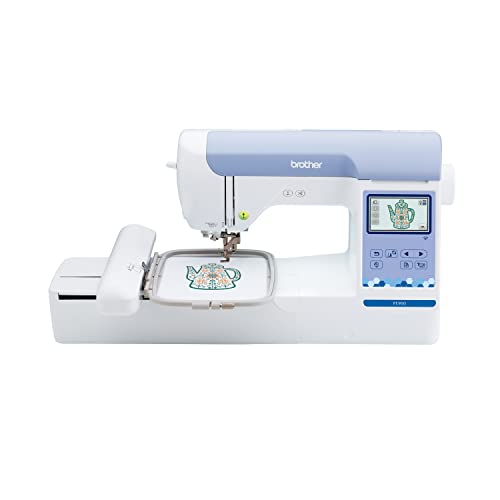
The Brother PE900 is the pick for makers who prefer to send designs from a phone or computer rather than carry a USB stick back and forth. Its wireless LAN connection supports design transfer and updates, and the machine cuts jump stitches as it works, which leaves cleaner results on multi-colour designs. The 5 inch by 7 inch embroidery field matches the other mid-size Brother models here, so it handles the same range of chest motifs, towels, and small quilt blocks. It is an embroidery-only machine, so the controls stay focused on design work.
Specs
- Wireless LAN connection
- 5 inch by 7 inch embroidery field
- Cuts jump stitches
- Embroidery-only machine
- Colour touchscreen display for design editing
- USB port for design import
Best for: Makers who want wireless design transfer and tidier multi-colour stitching.
Watch out for: Wireless setup depends on a stable home network, so confirm your craft room has a reliable signal before relying on that feature.
Janome Memory Craft 500E

The Janome Memory Craft 500E is built around a large embroidery field, and that single difference changes what you can attempt. Its maximum area of 7.9 inches by 11 inches fits long borders, large quilt blocks, and jacket-back motifs that smaller hoops would split into sections. The listing includes 160 built-in designs and six monogramming fonts, plus four included hoops for different project sizes. A top speed of 860 stitches per minute helps on dense fills, although dense designs still need the right stabiliser and careful hooping to stay flat.
Specs
- Maximum embroidery area of 7.9 inches by 11 inches
- 160 built-in embroidery designs
- 6 monogramming fonts
- 4 included embroidery hoops
- Top speed of 860 stitches per minute
- USB design import
Best for: Makers who stitch large designs and want fewer hoopings on quilts and jackets.
Watch out for: The larger hoops and machine footprint need a sturdy table and clear space behind the machine for the hoop to travel.
Janome Memory Craft 400E
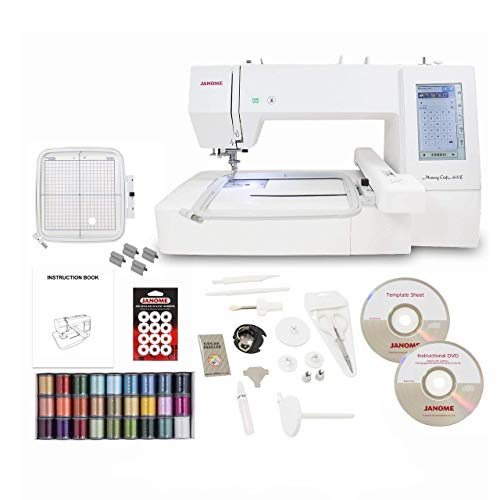
The Janome Memory Craft 400E offers a large square field for makers who stitch cushion covers, tote bags, and quilt squares rather than long rectangular borders. Its 7.9 inch by 7.9 inch area fits generous motifs in one placement, and the 160 built-in designs give plenty of choice for home textiles and gifts. Six fonts support monogramming, and USB import opens the machine to designs from independent sources. The touchscreen and on-screen editing help with rotating a design or combining it with lettering before the first stitch.
Specs
- Maximum embroidery area of 7.9 inches by 7.9 inches
- 160 built-in embroidery designs
- 6 fonts for monogramming
- USB port for design import
- Colour touchscreen display
- Embroidery-only machine
Best for: Home textile makers who want a large square field for cushions, totes, and quilt blocks.
Watch out for: A square field still limits very long borders, so measure a border design before assuming it will fit in one hooping.
Which One Fits Your Situation
You Mainly Make Personalised Gifts
Choose the Brother PE800, because its 138 built-in designs and 11 fonts cover names, initials, and seasonal motifs without extra purchases. The 5 inch by 7 inch hoop fits towels, baby clothes, and tote bags, and USB import lets you add a specific design when a gift needs something the built-in library does not include. Keep a small stock of plain towels and tote bags ready, so a last-minute gift never waits on a shopping trip.
You Need One Machine for Sewing and Embroidery
Choose the Brother SE1900, because it combines 240 sewing stitches with a full embroidery function and eight presser feet. You can construct a garment, add a pocket, and then embroider a motif on the same machine, which saves space and avoids moving a half-finished item between machines. That shared setup also keeps a half-finished garment in one place, instead of moving it between two machines.
You Stitch Large Quilt Blocks or Jacket Backs
Choose the Janome Memory Craft 500E, because its 7.9 inch by 11 inch field fits designs that smaller hoops would split. Fewer hoopings mean fewer alignment risks, and the four included hoops let you match the hoop to each block instead of forcing every design into one size. Plan the block order before you start, so each row lines up with the one above it.
You Want Wireless Transfers and Cleaner Colour Changes
Choose the Brother PE900, because wireless LAN transfer removes the USB step and automatic jump-stitch cutting keeps multi-colour designs tidier. It suits makers who prepare designs on a computer or phone and want the stitching stage to start with less handling. Save the resized design under a clear name, so the next multi-colour project starts from a known file.
Common Mistakes
- Buying the smallest hoop available and then discovering that most chest designs need rehooping.
- Choosing a machine for its built-in designs alone, without checking how designs are imported.
- Skipping stabiliser on stretchy fabric, which lets the design pucker and distort.
- Hooping fabric too loosely, so the design shifts partway through stitching.
- Ignoring table space, so the hoop hits a wall or a shelf during a large design.
Frequently Asked Questions
What hoop size suits most beginners?
A 5 inch by 7 inch hoop suits most beginners, because it covers chest motifs, towel borders, and small cushion designs without constant rehooping. A 4 inch by 4 inch hoop is simpler to handle and costs less space, but it limits you to names and small motifs. Measure the designs you plan to stitch most often before deciding.
Can an embroidery machine also sew regular seams?
Some machines can, and some cannot. Combination models such as the Brother SE1900 include sewing stitches and presser feet, so they sew seams and embroider. Embroidery-only models such as the PE800, PE900, and Janome 400E do not sew regular seams, so you would need a separate sewing machine for construction work.
Do I need a computer to use these machines?
No, you can start with the built-in designs and the touchscreen alone. A computer becomes useful when you want to buy, download, or edit designs from other sources. Machines with USB import accept those files directly, while wireless models can receive them over a home network.
How do I keep embroidery from puckering?
Use the stabiliser suited to the fabric, hoop the fabric and stabiliser smoothly without stretching, and test the design on a scrap of the same fabric first. Dense designs need firmer stabiliser than light outlines. Slow the machine slightly on delicate fabric and check the tension on a test piece before stitching the real item.
Related guides
More from Amazon
Programs that pair well with the guide above. Offers and eligibility are set by Amazon and may change.
Free shipping on eligible items, Prime Video and more. Eligible new members can start with a free trial.
Start a Prime free trialAudiobooks and podcasts to listen to on the go. Eligible new members can start with a free trial.
Try Audible freeAd-free music streaming. Eligible new subscribers can start with a free trial.
Try Music Unlimited freeA free business account with business pricing and bulk-buying tools for work, shop or home office.
Create a business accountAs an Amazon Associate we earn from qualifying purchases.
Write Your Review
No reviews yet. Be the first to share your experience!